
Yealink T55a Teams Phone Quick Guide
Summary: Yealink T55a Teams Phone Quick Guide
Download article(s)
 Yealink T55a Teams Phone Quick Guide.pdf
Yealink T55a Teams Phone Quick Guide
Yealink T55A
For more information, call us at 1-877-438-2855 or visit https://bullseyeresources.rightanswers.com/portal/ss
This guide will help you to understand and operate your new IP Phone.
Please print this guide and keep it handy!
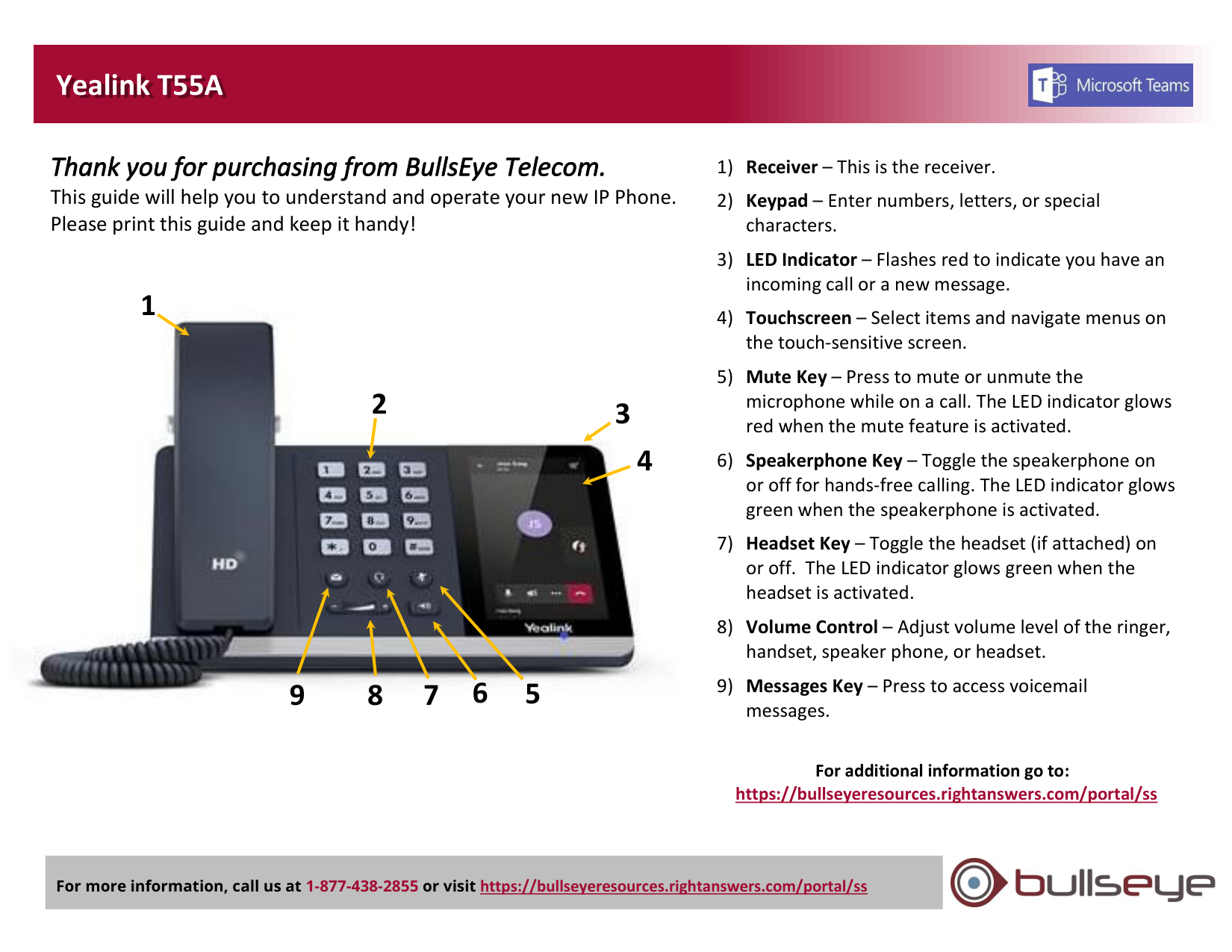
1) Receiver – This is the receiver.
2) Keypad – Enter numbers, letters, or special
characters.
3) LED Indicator – Flashes red to indicate you have an
incoming call or a new message.
4) Touchscreen – Select items and navigate menus on
the touch-sensitive screen.
5) Mute Key – Press to mute or unmute the
microphone while on a call. The LED indicator glows
red when the mute feature is activated.
6) Speakerphone Key – Toggle the speakerphone on
or off for hands-free calling. The LED indicator glows
green when the speakerphone is activated.
7) Headset Key – Toggle the headset (if attached) on
or off. The LED indicator glows green when the
headset is activated.
8) Volume Control – Adjust volume level of the ringer,
handset, speaker phone, or headset.
9) Messages Key – Press to access voicemail
messages.
For additional information go to:
https://bullseyeresources.rightanswers.com/portal/ss
3
5
7
9
1
2
4
6
8